A search such as “oregon football injury report” gives me a subject, but it doesn't tell me enough to build a useful page. I still have to decide what someone needs to learn when they open the result. Is this an explanation of an injury, an update on one player, or a current list of who might miss the next game?
That decision is where I start a page brief. By brief, I mean short instructions for whoever writes or builds the page, including me. It should explain what the reader came for and give the writer enough direction to answer it. A list of keywords leaves too much of that work undone.
What the searches actually tell me
The Quack Report is my independent Oregon Ducks football site. Bing Webmaster Tools, which reports searches that brought a site into its results, includes “oregon football injury report” and “oregon ducks football injury report today” for this site. The examples come from its September 28 to October 25, 2026 report.
The word “today” matters. Someone needs to know how current the answer is, because an accurate report from last week might be useless for the next game. The broader injury-report search also points toward a roundup rather than a long explanation of one injury.
Neither search tells me the person's circumstances or exact reason for looking. I don't know whether that person is planning to attend, following a particular player or simply checking the team. I can still make a design choice: the page should let someone find the latest reported availability without assembling it from several stories.
Turn that interpretation into instructions
Using those searches, I would give a writer the following brief for the injury report.
| Part of the brief | Instruction for this page |
|---|---|
| Reader | Someone checking Oregon's player availability for the next game. |
| Main question | Who is reported out, who is uncertain, and how current is this information? |
| Opening | Name the upcoming opponent and game date, then show the latest availability summary and when it was checked. |
| Sources | Link the reporting behind each status. Keep confirmed absences separate from uncertain availability. |
| Page structure | Put the current summary before background, with player details available beneath it. |
| Next step | Make each player's name a link to the update explaining their availability. |
| Leave out | General injury advice and unrelated team news that would bury the current report. |
Each row answers a practical writing question. Naming the next game prevents an old report from looking current. Separating uncertain availability from confirmed absences prevents the design from suggesting more confidence than the reporting supports. Linking the player update gives someone a way to investigate without making everybody read the full background first.
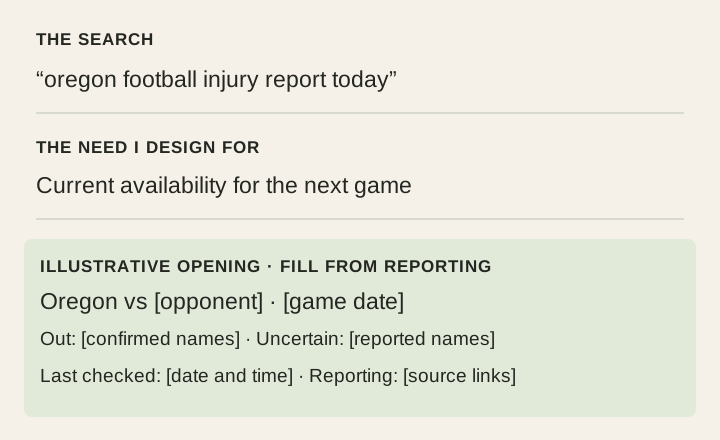
See what changes in the opening
Without that brief, a writer could reasonably begin with a paragraph about how injuries affect a football season. It would be on topic, but someone checking today's availability would still be waiting for the answer.
With the brief, the opening has a clear order: which game this covers, the current availability summary, and the last check. The reporting follows close enough that a reader can verify a status. This also gives me a way to judge a draft: can I point to where it answers the question, or does it spend its opening talking around it?
The same reasoning applies outside sports. If the search asks about a warranty, the opening needs to help someone establish whether their situation is covered. If it asks about a venue's bag policy, the answer they need is what they can bring. My search-intent guide explains how I distinguish those needs before deciding what sort of page to make.
Where AI helps me, and where I make the call
When there are too many searches to read comfortably, I use AI to help organize them before writing the brief:
- Group searches by the answer they need. In this example, an injury roundup belongs together, while advice about recovering from an injury would be a separate group. I keep the original searches beside each group so I can check its meaning.
- Look for differences that change the page. “Today” makes the last check important. A named player could need an individual update linked from the roundup. If two groups require different answers, I consider separate pages rather than forcing both into one outline.
- Choose the question this page will resolve. I write that choice down before asking for a draft, along with the sources and the answer needed first. Anything useful for another question can become a link instead of another section.
The grouped searches give me a shortlist of questions, with the original wording beside each one. I choose which question to answer and use the brief to explain what belongs on that page.
Check the brief against the finished page
Before adding more sections, I compare the opening, evidence and next link with the brief. On the injury report, that means checking whether someone can find current availability, distinguish uncertainty and reach the underlying update.
Then I ask someone unfamiliar with the page to find the answer and explain it back to me. If they cannot tell which information is current or which statuses remain uncertain, I have a specific problem to fix.
For your own page, pick one real search, write down the question behind it, and compare your page's opening with that question. You should be able to explain why the answer starts where it does and what the reader can do next.
If a research tool has turned those searches into a list of missing pages, try deciding whether each topic needs a new page. The lesson gives you the page Google already showed and asks whether it answers the question.
First published October 30, 2026.