A fan choosing something for themselves and a parent buying a gift can open the same guide with very different questions. The fan may know the books, the editions and what they already own. The parent may not even know where the series starts. A recommendation that sounds obvious to one can leave the other unsure whether they're about to buy the wrong thing.
That difference shaped the holiday update to a gift guide on my independent fan reference site. The guide helps people choose gifts for readers of a book series. The buying decision is familiar: how do you choose something thoughtful when you don't know the subject yourself?
Why I updated the existing guide
Before the holiday update, Search Console, Google's report on a site's search performance, showed the guide appearing for gift-related searches. The holiday version would still help someone choose a gift for the same audience. Keeping that page meant improving the guide those searches already led to, rather than giving readers another version to choose between.
I would consider a separate page for a different task, such as planning a visit to a particular holiday event. Here, the core task stayed the same: choose a gift for a reader. The season changed the recommendations and the urgency, so I put those changes on the existing URL.
This is the same question I ask when deciding whether a topic needs its own page: would another page help someone reach a different answer?
Show the buyer when to choose, and when to skip
The updated guide gives each recommendation a best-fit buyer, a comparison with an alternative and a reason to skip it. Those details help someone unfamiliar with the series make a choice without having to become a fan first.
One recommendation compares a display edition, a decorative hardcover made to keep on show, with a standard hardcover. “A great edition for any fan” would leave the buyer guessing. The guide instead explains that the display edition suits someone who already owns and loves the first book. For someone starting the series, it recommends the standard hardcover and says to skip the showpiece.
In plain terms, the recommendation is:
Choose the display edition for someone who already owns the first book and would enjoy a copy to keep on show. If they have not started the series, give the standard hardcover instead.
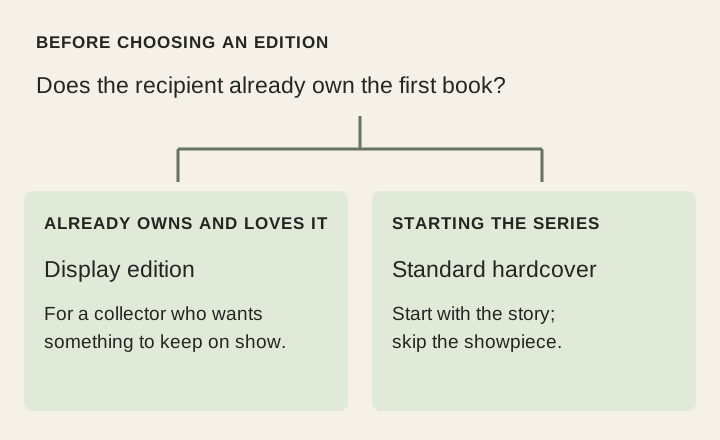
The buyer now has something useful to check: does the recipient already own the book? The more expensive-looking option stops being the automatic recommendation. Other picks explain how far into the series a reader should be before browsing them, because a gift should not spoil the story.
My guide to commercial search intent develops this comparison work. A shopping page becomes useful when it explains the differences that matter to the person choosing.
Put that help where a phone reader can use it
The updated guide puts its recommended gifts near the top, ahead of the longer explanations. Each summary needs enough context to help someone choose where to read next. A compact row of unfamiliar product names would save space while leaving the buyer with the same uncertainty.
I also added links to the guide from the homepage, mobile menu and related pages. On a page introducing the books, a gift link should help someone buying for a new reader. A general gift-guide link can suit a broader page. The wording should follow what someone has just been reading, so the link feels like a useful continuation.
That gives the seasonal guide a place in the existing site. A banner can remind people about it, but the relevant links still need to work when the promotion comes down.
Give the seasonal details an end date
For this holiday version, January 2, 2027 is the point to remove the Christmas framing and return to a year-round gift guide. Delivery statements need checking sooner, whenever the seller's information changes.
The recommendations also need another look. An edition can disappear, a product link can change destination and a newer option can make yesterday's advice less useful. How I maintain my sites explains the broader habit of returning to information that can go stale.
Keep a baseline for the follow-up
Before the update, Google recorded 848 impressions for the guide across 14 reported queries, meaning it appeared in results for those searches. These figures cover July 9 to October 23, 2026 and come from the search report filtered to this guide. They show that the existing page already appeared for gift searches before the update.
After the holiday season, I can compare which searches bring people to the guide, how they reach it from the rest of the site and which recommendation links they use. Seasonal demand will be part of any change, so a rise in traffic alone will not tell me which edit helped.
The page has a useful job before that follow-up: help an unfamiliar buyer understand the choices well enough to give something the recipient will enjoy. That is the reason to refresh it, whether the next report is flattering or not.
First published October 30, 2026.